IEability Usage Guide
IEability uses the Internet Explorer rendering engine. This rendering engine cannot be accessed directly from the Chrome extension, so we need a helper to talk between the Chrome extension and the rendering engine.
100% secure, view security test resultsStep 2:
Click ieability.exe to run the ieability installer.

Step 3:
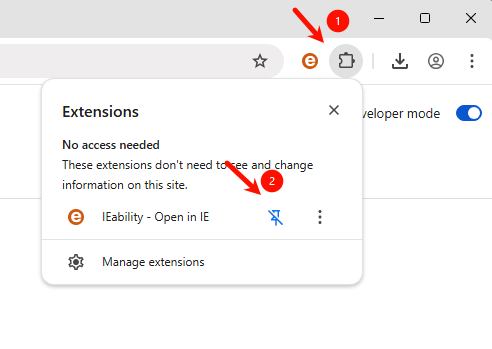
Click the extension icon in the upper right corner of the Chrome browser, or use the "IEability" option > Open the current page with 'IE' in the right-click menu to switch to IE mode.
If you have any questions, please contact [email protected]
FAQ
Due to Chrome extension sandbox restrictions, a small helper application is required to communicate with the Internet Explorer engine.
Absolutely! IEability has always used native code, and we have always attached great importance to user security. The software package has passed (Microsoft, Kaspersky, Malwarebytes, BitDefender, Symantec, 360, Tencent Butler) security certification. You can rest assured that this helper tool is safe to use.
You need to enable cookie synchronization. When the cookie synchronization is enabled, the login status of Chrome and IE will remain the same.
Click the "bug" icon on the top banner to run the developer tools.
Close the IE mode tab or click the close button on the top banner.
You need to enable the automatic IE mode option, and then add the url to the list of rules.